Introduction:
To understand the difference between Synchronous and Asynchronous programming, one must look at flow of execution: how a computer program behaves when it encounters a task that takes time to complete, such as reading a file from a hard drive or fetching data from a server.
Here is a detailed discussion of the two concepts.
Synchronous Programming: The Sequential Execution Model
Synchronous programming is the traditional, default model of execution in most programming languages. In this model, tasks are performed one at a time, in the exact order they appear in the code.
The Blocking Nature of Synchronous Code
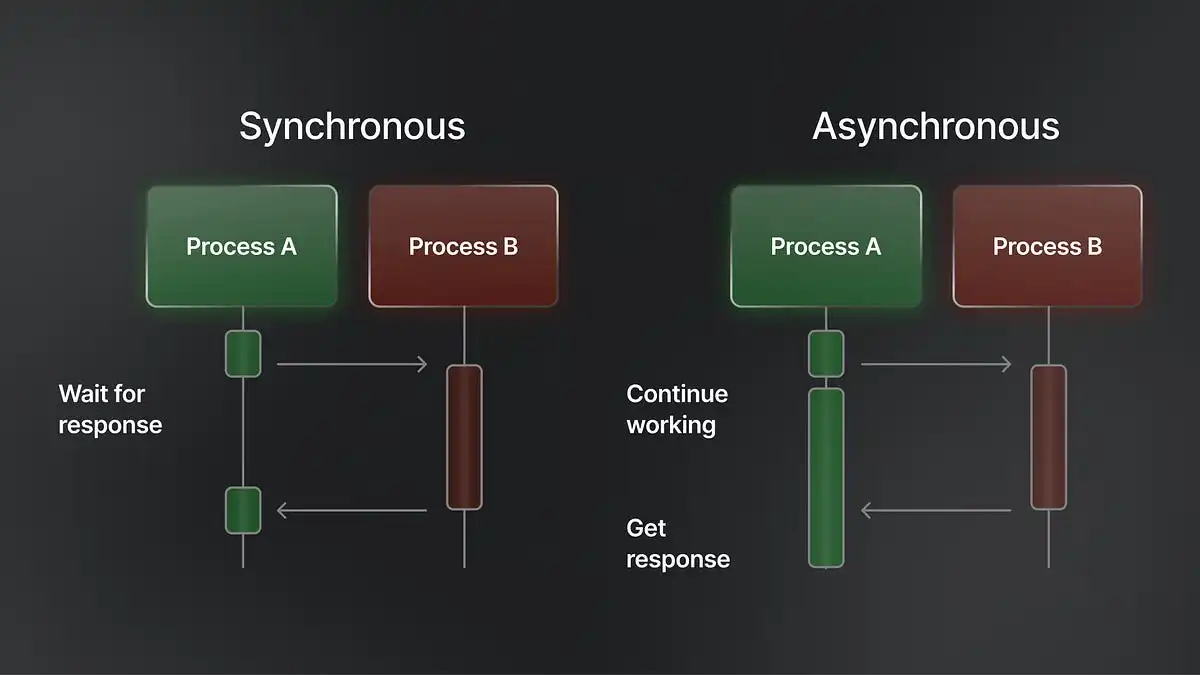
The defining characteristic of synchronous programming is that it is blocking. This means that when the program initiates a task, it pauses (or “blocks”) strictly until that task is finished. The program cannot move to line 2 until line 1 has completely returned a result.
If a specific task takes 10 seconds (like a complex mathematical calculation or a slow database query), the entire application effectively freezes for those 10 seconds. The CPU waits for the result before it can process the next instruction.
Real-World Analogy: The Single-Lane Bridge
Imagine a single-lane bridge where only one car can cross at a time.
- Car A drives onto the bridge.
- Car B must wait at the entrance.
- Car B cannot move an inch until Car A has completely exited the other side.
- The flow is strictly linear; there is no overtaking and no multitasking.
Primary Advantages
- Simplicity and Readability: The code reads just like a book top to bottom. The logic is easy to follow because you know exactly what state the program is in at any given line.
- Easier Debugging: If a crash occurs, it is easy to trace the sequence of events because they happened in a straight line.
Asynchronous Programming: The Non-Blocking Execution Model
Asynchronous programming allows a unit of work to run separately from the main application thread. This model is designed to handle tasks that might take an indeterminate amount of time without freezing the rest of the program.
The Non-Blocking Nature of Asynchronous Code
The defining characteristic here is that it is non-blocking. When the program encounters a long-running task (like downloading a large image), it initiates the task and immediately moves on to the next line of code without waiting for the download to finish.
The heavy task runs in the “background” (handled by the browser, the operating system, or a separate thread). When the task eventually finishes, it notifies the main program that usually through a mechanism called a callback, a promise, or an event and the program then processes the result.
Real-World Analogy: The Restaurant Kitchen
Imagine a busy restaurant kitchen.
- The chef puts a steak on the grill (Start Task A).
- The chef does not stare at the steak for 10 minutes waiting for it to cook.
- Instead, while the steak cooks, the chef chops vegetables for a salad (Start Task B) and plates a dessert (Start Task C).
- When the steak is ready, the chef returns to it to finish the plate. The chef (the CPU) remains busy and productive, handling multiple orders “concurrently” rather than doing one thing at a time.
Primary Advantages
- Performance and Responsiveness: This is critical for User Interfaces (UIs). It ensures a website or app doesn’t freeze while loading data. The user can still scroll and click while background tasks process.
- High Throughput: For servers, this means handling thousands of requests simultaneously. While one request waits for a database, the server can accept and process requests from other users.
Detailed Comparison of Operational Behavior
1. Resource Utilization and Efficiency
- Synchronous: This can be inefficient for I/O-bound tasks (Input/Output). If the CPU is fast but the network is slow, the powerful CPU spends most of its time idle, waiting for the network. It is like a Ferrari stuck in traffic.
- Asynchronous: This is highly efficient for I/O tasks. The CPU hands off the slow network request to the system and immediately finds other work to do. The resources are fully utilized.
2. Complexity and Error Handling
- Synchronous: Errors are usually caught immediately in the context where they occur. Using standard try/catch blocks is straightforward.
- Asynchronous: Managing the complexity is difficult. Because tasks finish in an unpredictable order, “Race Conditions” can occur (where the outcome changes based on which task finishes first). Error handling is also harder, as you must ensure errors in background tasks are properly caught and reported back to the main thread.
3. Use Cases: When to Use Which?
Choose Synchronous When:
- You are writing simple scripts or automation tools.
- The tasks are CPU-bound (heavy calculation, video processing, machine learning models) where the processor is working 100% of the time and there is no “waiting” involved.
- Task B technically cannot start until Task A is finished (dependency is strict).
Choose Asynchronous When:
- You are building a web application or server (e.g., Node.js).
- The tasks are I/O-bound (querying a database, reading files, API calls).
- You need to keep a UI responsive (mobile apps, desktop dashboards).
To understand the difference between Synchronous and Asynchronous programming, one must look at flow of execution: how a computer program behaves when it encounters a task that takes time to complete, such as reading a file from a hard drive or fetching data from a server.
Here is a detailed discussion of the two concepts.
Synchronous Programming: The Sequential Execution Model
Synchronous programming is the traditional, default model of execution in most programming languages. In this model, tasks are performed one at a time, in the exact order they appear in the code.
The Blocking Nature of Synchronous Code
The defining characteristic of synchronous programming is that it is blocking. This means that when the program initiates a task, it pauses (or “blocks”) strictly until that task is finished. The program cannot move to line 2 until line 1 has completely returned a result.
If a specific task takes 10 seconds (like a complex mathematical calculation or a slow database query), the entire application effectively freezes for those 10 seconds. The CPU waits for the result before it can process the next instruction.
Real-World Analogy: The Single-Lane Bridge
Imagine a single-lane bridge where only one car can cross at a time.
- Car A drives onto the bridge.
- Car B must wait at the entrance.
- Car B cannot move an inch until Car A has completely exited the other side.
- The flow is strictly linear; there is no overtaking and no multitasking.
Primary Advantages
- Simplicity and Readability: The code reads just like a book top to bottom. The logic is easy to follow because you know exactly what state the program is in at any given line.
- Easier Debugging: If a crash occurs, it is easy to trace the sequence of events because they happened in a straight line.
Asynchronous Programming: The Non-Blocking Execution Model
Asynchronous programming allows a unit of work to run separately from the main application thread. This model is designed to handle tasks that might take an indeterminate amount of time without freezing the rest of the program.
The Non-Blocking Nature of Asynchronous Code
The defining characteristic here is that it is non-blocking. When the program encounters a long-running task (like downloading a large image), it initiates the task and immediately moves on to the next line of code without waiting for the download to finish.
The heavy task runs in the “background” (handled by the browser, the operating system, or a separate thread). When the task eventually finishes, it notifies the main program which usually through a mechanism called a callback, a promise, or an event and the program then processes the result.
Real-World Analogy: The Restaurant Kitchen
Imagine a busy restaurant kitchen.
- The chef puts a steak on the grill (Start Task A).
- The chef does not stare at the steak for 10 minutes waiting for it to cook.
- Instead, while the steak cooks, the chef chops vegetables for a salad (Start Task B) and plates a dessert (Start Task C).
- When the steak is ready, the chef returns to it to finish the plate. The chef (the CPU) remains busy and productive, handling multiple orders “concurrently” rather than doing one thing at a time.
Primary Advantages
- Performance and Responsiveness: This is critical for User Interfaces (UIs). It ensures a website or app doesn’t freeze while loading data. The user can still scroll and click while background tasks process.
- High Throughput: For servers, this means handling thousands of requests simultaneously. While one request waits for a database, the server can accept and process requests from other users.
Detailed Comparison of Operational Behavior
1. Resource Utilization and Efficiency
- Synchronous: This can be inefficient for I/O-bound tasks (Input/Output). If the CPU is fast but the network is slow, the powerful CPU spends most of its time idle, waiting for the network. It is like a Ferrari stuck in traffic.
- Asynchronous: This is highly efficient for I/O tasks. The CPU hands off the slow network request to the system and immediately finds other work to do. The resources are fully utilized.
2. Complexity and Error Handling
- Synchronous: Errors are usually caught immediately in the context where they occur. Using standard try/catch blocks is straightforward.
- Asynchronous: Managing the complexity is difficult. Because tasks finish in an unpredictable order, “Race Conditions” can occur (where the outcome changes based on which task finishes first). Error handling is also harder, as you must ensure errors in background tasks are properly caught and reported back to the main thread.
3. Use Cases: When to Use Which?
Choose Synchronous When:
- You are writing simple scripts or automation tools.
- The tasks are CPU-bound (heavy calculation, video processing, machine learning models) where the processor is working 100% of the time and there is no “waiting” involved.
- Task B technically cannot start until Task A is finished (dependency is strict).
Choose Asynchronous When:
- You are building a web application or server (e.g., Node.js).
- The tasks are I/O-bound (querying a database, reading files, API calls).
- You need to keep a UI responsive (mobile apps, desktop dashboards).
Conclusion: The Trade-Off Between Control and Efficiency
Meanwhile, the choice between synchronous and asynchronous programming is not about which method is superior, but rather which problem you are trying to solve.
Synchronous programming offers strict control and simplicity. It is the best choice when the logic is linear, the tasks are dependent on one another, or the operations are heavy on the CPU (calculations). It prioritizes predictability over speed.
Asynchronous programming offers efficiency and responsiveness. It is the essential choice for modern applications that rely on networks, databases, or user interaction. It prioritizes concurrency—ensuring that the system never sits idle while waiting for a slow external process to finish.
Mastering modern software development requires knowing when to use the stability of the synchronous “single-file line” and when to deploy the speed of the asynchronous “multitasker.”